

System Updates
Kagodora Omstem Status & Uprate Journal
Kagodora system updates are Kagodora Omstem updates journals of status and upgrades are displayed here when they occur. Enjoy the process be apart of the conversation.
Building a custom them for BaOmBaKaTaRa.com Ray 2051 May 19
Its Ray 2051 last update I did was Ray 2049. We have been spending the last two rays building out the BaomBaKaTaRa website starting with a custom template before we intergrade elements of the kagodora Omstem to synchronize he membership points and other aspects. Below is a Deepseek break down of what has been accomplished.
Baombakatara Custom WordPress Theme – Complete Summary & Build Documentation
This document summarises the entire development of the Baombakatara custom WordPress theme. Use it to understand the architecture, replicate the setup, or continue integrating additional features (points system, surveys, etc.). The theme is built from scratch, with no third‑party page builders or premium themes – only custom code.
🧱 Theme Structure & Key Files
| File | Purpose |
|---|---|
style.css | Theme metadata (name, author, description). Minimal styling; most CSS is in template files. |
functions.php | All theme setup, custom post types, custom fields, enqueues, duplication, block editor support, Customizer settings. |
header.php | Fixed red clock bar (compact digital clock + Kagodora logo), transparent main header (custom logo, site title, navigation menu). |
footer.php | Simple footer with copyright, wp_footer() hook. |
front-page.php | Scroll‑snap homepage that loops through custom post type “Homepage Sections”. |
page.php | Individual page template: full‑width hero image (featured image) at top, white content area below. |
single.php | (Optional) For blog posts – not built yet. |
page-home.php | (Not used – we use static front page with page.php.) |
/js/compact-clock.js | Fetches authoritative time from kagodora.com API, updates the clock values in the red bar. |
/assets/logo.png | Placeholder for the custom logo (can be overridden via Customizer). |
/js/editor.js | Empty file for block editor enqueue (required to avoid missing file errors). |
⏰ Compact Clock (Red Bar)
Features
- Fixed at top of all pages (z‑index 1000).
- Background colour:
#dc2626(red). - Displays Ring, Turn, Ray, AhDo, AhGo, AhSa, AhTa, SaOnDo.
- Includes a Kagodora logo (image URL can be changed) as the first item.
- Updates automatically every second (local time calculation) and re‑syncs with
kagodora.comevery 60 seconds.
JavaScript (compact-clock.js)
- Fetches
https://kagodora.com/wp-json/kagodora/v1/current-time. - Falls back to local incremental time if API fails.
- Uses the same time formulas as the Kagodora plugin (ring = 6 + floor((ray-1801)/360), etc.).
📌 Header (Main Header – Below Red Bar)
Structure
.logo-areacontains:.circle-logo(50×50px, yellow fallback). Displays custom logo if set via Customizer → Site Identity; otherwise usesassets/logo.png..site-title– dynamic site name (bloginfo('name')).
- Navigation menu (
wp_nav_menu) – centred, withmain-menuclass.
Customizer Controls (in functions.php)
| Section | Setting | Default | What it controls |
|---|---|---|---|
| Header Background | Background colour | transparent | .main-header, .logo-area background colour. |
| Header Background | Background image | (empty) | Background image (overrides colour). |
| Header Text | Site Title Colour | #ffffff | Colour of the .site-title text. |
| Menu Text | Menu Text Colour | #ffffff | Colour of .main-menu li a links. |
| Page Titles | Page Title Colour | #1e3a8a | Colour of <h1> inside .page-content-area (individual pages). |
All customizer CSS is output inline in <head> with !important to override any inline styles.
🏠 Homepage (Scroll‑Snap Sections)
Custom Post Type: section
- Admin menu: Homepage Sections.
- Supports:
title,editor,thumbnail(featured image). - Orderable by drag & drop (via
menu_order). - Custom meta box: Button Link (URL) – optional.
Template: front-page.php
- Wrapper
.sections-containerwith vertical scroll‑snap (scroll-snap-type: y mandatory). - Each
.section:- Background image: featured image of the section (fallback to default farm image).
- Overlay (
::before) with semi‑transparent black. - Centred content: title, content (from editor), optional button link.
- The default background image (from
header.php) is hidden on the homepage (<style>.full-bg { display: none !important; }).
📄 Individual Pages (e.g., Farm, Water, Retreat)
Template: page.php
- Hero area: Uses the page’s featured image (fallback to default farm image).
- Full width (
width: 100vwwith negative margin trick to break out of any parent constraint). - Height:
60vhon desktop,40vhon mobile. - Background‑size:
cover(ensures image fills area without distortion).
- Full width (
- Content area: White background, padding, centred text. Displays:
- Page title (
<h1>) – colour adjustable via Customizer. - Page content (
the_content()– block editor ready).
- Page title (
Notes
- The default
.full-bg(global background) is automatically hidden on pages that have a featured image (via inline CSS). - If no featured image is set, the default hero image appears (same as default background).
🧩 functions.php – Key Components
Theme Setup
- Post thumbnails support.
- Custom logo support (WordPress native).
- Navigation menu registration (
primary).
Custom Post Type: Homepage Sections
sectionpost type.- Supports thumbnails, block editor.
- Orderable by
menu_order.
Custom Field: Button Link
- Meta box for
_section_button_url. - Saves as URL.
Duplicate Post Functionality
- Adds “Duplicate” link in admin list for pages and sections.
- Copies post content and custom field.
Block Editor Support
add_theme_supportfor wide alignment, responsive embeds, etc.- Enqueues empty
editor.jsto satisfy the editor.
Customizer Sections
- Header Background, Header Text, Menu Text, Page Titles (all documented above).
- Outputs CSS inline in
<head>.
Enqueues
compact-clock.js(front‑end).style.css(main theme styles).
🛠️ Major Issues Resolved
| Issue | Solution |
|---|---|
| JSON error when saving posts | Plugin conflict with custom AJAX actions. Fixed by isolating plugin code (not a theme issue). |
| Missing “Set featured image” box | Added add_theme_support('post-thumbnails') and ensured thumbnail support in CPT registration. User also needed to enable via Screen Options. |
| Scroll‑snap jumping, menu hidden | Used scroll-margin-top on sections (120px) and removed padding-top from container. Adjusted to match fixed header height. |
| Hero image not full width, gaps on sides | Used left: 50%; margin-left: -50vw; width: 100vw; trick to force full viewport width. |
| Default background image showing over page hero | Conditionally hid .full-bg when page has a featured image (inline CSS). |
| Header had white background | Removed !important from inline styles and used Customizer CSS with !important to override. |
| Customizer site title / menu text / page title not updating | Added specific CSS selectors and output in <head> with high priority (99). |
| Logo and site title not editable | Added native custom logo support and used bloginfo('name'). |
Compact clock not syncing with kagodora.com | Created REST API endpoint on kagodora.com and modified JS to fetch and re‑sync every minute. |
📦 Dependencies & External APIs
- No external plugins required – everything is built into the theme.
- Kagodora.com API endpoint (must remain active for compact clock to show real time):
- URL:
https://kagodora.com/wp-json/kagodora/v1/current-time - Returns JSON:
{ ahta, ahsa, ahgo, ahdo, ray, ring, turn, timestamp }
- URL:
Kagodora kado banner Ray 2049 :46 May 17 2:46
I have been working on a custom baombakatara.com website to link to kagodora.com and in the design I wanted a kagodora kado counter in the header. So we created one. If you have a website and you want to represent the sound timeline you can download the code and post it to your header.
How to earn Points page created Ray 2047 AhDo 8:08 -May 15 10:24pm
How to Earn (and Spend) Points on Kagodora
Your points balance is the heart of the Kagodora ecosystem. Points are managed by myCRED and can be earned through many activities – from reading messages and uploading images to writing journal entries, building calendars, and participating in surveys. Points can also be spent on broadcasts, image uploads, social posts, and more.
Below is the complete list of all point‑earning and point‑spending actions currently available.
📈 Earning Points
| Action | Points Awarded | How to Do It |
|---|---|---|
| Welcome bonus | +100 | Automatically awarded when you register a new account. One time only. |
| Read a message (inbox) | +1 | Open your inbox ( |
| Receive a “Helpful” vote (on a message) | +2 | When another member finds your message (private or broadcast) helpful, they click the 👍 Helpful button. You earn points for each helpful vote. |
| Journal entry | +20 | Use the journal form ( |
| Upload an image (net) | +10 (reward) | Upload cost is 50 points, but you receive 10 points back after a successful upload. Net cost is 40 points. You must have at least 50 points to start. |
| Like an image (escrowed) | +2 per like | In the image gallery ( ), click Like. Points are held in escrow until that image is used in a paid calendar. Then they are released to you. |
| Purchase a calendar | +50 | When you buy a Kagodora calendar (through a marketplace listing or a private order), you receive 50 points. |
| Your image used in a calendar (royalty) | +50 | If another member uses one of your approved images in a calendar that sells, you earn 50 royalty points. |
| Your calendar listing sells (builder bonus) | +100 | When you create a calendar using |
| Complete a survey (quiz mode) | Variable | Each question has a point value. Your total reward is the sum of points for all correct answers. Points are awarded automatically upon submission. |
| Complete a survey (research mode) | Admin‑defined reward | For open‑ended surveys, points are awarded only after an admin reviews and approves your response. |
| Receive a like on your social post | +1 per like | Other members can click Like on your public post in the community feed (
). The platform pays this reward. |
| Convert Anu tokens to myCRED points | + (tokens × exchange rate) | Use the Anu Bridge ( |
💸 Spending (Deducting) Points
| Action | Points Cost | How to Do It |
|---|---|---|
| Upload an image | –50 (cost) | You must have at least 50 points to upload. The cost is deducted immediately when you submit the upload form. |
| Send a broadcast announcement | –50 (default) | Use the broadcast form ( |
| Publish a social post | –8 | Use |
| Convert myCRED points to Anu tokens | – (tokens × rate + fee) | Use the Anu Bridge ( |
Note: Private messages between members are free – they do not cost or award points to the sender.
📊 How to Check Your Points & Activity
- Total balance is displayed in the myCRED wallet (usually on your account page).
- Recent messaging activity (read messages, broadcasts, helpful votes) can be displayed with the shortcode
Please log in to see your points activity.
- Pending escrow points (from image likes) can be seen via the
Please log in to see your wallet.
- Full points history (all transactions) can be viewed in the myCRED plugin logs (admins can also provide an export).
🤔 Frequently Asked Questions
Q: Do I earn points every time I read the same message?
A: No. Points are awarded only the first time you mark a message as read.
Q: If my broadcast is rejected, do I get my points back?
A: No. Points are deducted only when the broadcast is approved and sent. If rejected, no points are taken.
Q: What are “escrowed” points from liking images?
A: When you like an image, 2 points are set aside (escrowed). They are not available in your balance until that image is used in a paid calendar. Once the image sells, the escrowed points are released to you. This encourages supporting images that may become commercially successful.
Q: Can I lose points for negative actions?
A: Currently, only the positive spending actions (upload, broadcast, social post, points→tokens) deduct points. There are no penalties for spam or bad behaviour (except admin moderation).
Q: Where do the points come from?
A: Points are awarded by the system; they are not transferred from other users. The “helpful” points, like rewards for social post likes, and royalty points all come from the platform itself.
Q: What are Anu tokens and how do I use them? Please log in to mint products.
A: Anu tokens are a separate internal currency. You can convert points to tokens (costs points) and later convert tokens back to points (no fee). Tokens can also be used to mint physical products (books, apparel, decoding cards) via the Anu Bridge minting shortcode
Q: How can I earn points every day?
A: Write a journal entry (20 points daily), read any new messages in your inbox, and like images to accumulate escrowed points for future release.
💡 Tips to Maximise Your Points
- Read your inbox regularly – each new message gives 1 point.
- Write a journal entry every day – quick 20 points.
- Upload high‑quality images – they may receive many likes, and if they get used in calendars, you earn royalty points.
- Be helpful – reply to messages and broadcasts; if others mark your messages “helpful”, you earn 2 points each time.
- Participate in quiz surveys – they can give a lump sum of points.
- Build and list calendars – when they sell, you earn 100 points plus 80% of the sale price.
- Convert tokens strategically – if you accumulate Anu tokens, you can mint physical products or convert back to points when needed.
⚙️ Shortcode Reference
| Shortcode | Purpose |
|---|---|
| View messages, mark as read, send private messages |
| Send an announcement to all members (costs points) |
| Show last 2 messaging‑related point transactions |
| Show your points balance and pending escrow |
| Upload images (costs points) |
| Browse and like images |
| Write a journal entry (earn points daily) |
| Build a custom calendar and list it on the marketplace |
| Publish a public social post (costs points) |
| View and like social posts |
| Take a survey (quiz or research) |
| Convert points ↔ Anu tokens |
| Mint physical products using Anu tokens |
This document is up to date as of version 1.9.11 of the Kagodora Image Upload & Royalty plugin and version 1.0.7 of the Kagodora Engagement Suite.
Enjoy earning points and building the Kagodora universe!
Kagodora Points Activity Shortcode ray 2047 AhDo 7:30 -May 15 9:55
Kagodora Points Activity Shortcode
After posting that he engagement suit code was error free we encountered some errors with the short code being placed in the body of post text and removed the brackets to resolve the issue for now. In the process we produced a points activity element including a new page listing all the methods to earn Anu points.
Overview
The Please log in to see your points activity.
This shortcode is designed to sit alongside your existing myCRED wallet (which shows the total balance) and provides context for how that balance has changed through recent messaging activity.
How It Works
The shortcode queries the myCRED log table (wp_mycred_log) for the currently logged‑in user and filters only those transactions where the reference (the action type) begins with kagodora_. These references are automatically recorded by the Kagodora Engagement Suite’s myCRED hooks:
kagodora_read_message– awarded when a user marks a message as read.kagodora_broadcast_cost– deducted when a user sends a broadcast (if a points cost is set).kagodora_helpful– awarded to a message sender when another user clicks “Helpful” on their message.
Each transaction includes the date, the number of points (with a + or – sign), a human‑readable description, and – where possible – a direct link back to the original message or the admin broadcast approval screen.
What It Displays
For each of the last two transactions, the output includes:
- Points change (e.g.,
+1 pointsor-50 points) - Date and time (in your WordPress site’s time format)
- Activity description – for example:
- “Read a message”
- “Sent a broadcast”
- “Your message was marked helpful”
- Optional link – “View message” or “View approval” that takes the user directly to the relevant inbox item or admin approval page.
If no messaging‑related points activity has occurred yet, the shortcode shows a simple message: “No messaging points activity yet.”
If myCRED is not active, it shows: “Points system is not active.”
Where to Use It
The shortcode is intended to be placed on the user’s account page – the same page where the myCRED wallet is already displayed. This gives members a complete view of their points balance (from the wallet) and the specific actions that have affected it (from the activity list).
Example placement:
htmlCopyDownloadRun
<!-- shows total points -->Please log in to see your points activity.
<!-- shows recent messaging activity -->
You can also place it on any other page where you want to show a user their recent points activity, such as a custom dashboard or a “My Activity” page.
Customisation
The shortcode is hard‑coded to show two entries (the default). To show more or fewer, edit the plugin file and change the LIMIT 2 in the SQL query to any positive number. For example, to show the last 5 entries:
phpCopyDownload
LIMIT 5
All other output (date format, link text) can be customised by editing the kagodora_eng_points_activity_shortcode() function inside the plugin.
Benefits for Users
- Transparency – Members see exactly why they gained or lost points from messaging actions.
- Engagement – Seeing recent activity encourages users to read messages, send helpful feedback, and participate in broadcasts.
- Convenience – Links directly to the message or approval screen save users from searching.
- Integration – Works seamlessly with the existing myCRED wallet, no extra configuration needed.
Technical Notes
- The shortcode is only available on the front‑end and only for logged‑in users.
- It requires the myCRED plugin to be active and the Kagodora Engagement Suite’s myCRED hooks to be enabled.
- Links assume the inbox page slug is
/inbox/. If your inbox page has a different slug (e.g.,/nbox/), update thehome_url('/inbox/')sections in the plugin file accordingly. - The shortcode does not run during AJAX requests or in the admin area, so it never interferes with post saving or other admin‑side functionality.
Example Output (HTML)
htmlCopyDownloadRun
<div class="kagodora-points-activity">
  <h4>Recent Messaging Activity</h4>
  <ul>
    <li>
      <strong>+1 points</strong><br>
      <small>May 15, 2026 10:23 am</small><br>
      Read a message – <a href="/inbox/?msg_id=42">View message</a>
    </li>
    <li>
      <strong>-50 points</strong><br>
      <small>May 14, 2026 3:15 pm</small><br>
      Sent a broadcast – <a href="/wp-admin/admin.php?page=kagodora-engage-broadcasts">View approval</a>
    </li>
  </ul>
</div>
Summary
The Please log in to see your points activity.
The Kagodora Engagement Suit is now error free and functional Ray 2047 AhDo 6:20 May 15 7:24pm
The Kagodora Engagement Suit is now error free and functional. After hours of trouble shooting removing the nasa api notification and setting up the email page to establish a url seemed to correct the error in the plugin that was not allowing the website to save changes or refresh without dislaying double email errors.
Kagodora Engagement Suite – Plugin Description
Purpose
The Kagodora Engagement Suite transforms your WordPress site into a fully interactive community hub. It provides a private, points‑driven messaging system where members can communicate directly, receive system‑wide announcements, and earn rewards for active participation. Built for the Kagodora ecosystem, it also displays timestamps in the unique Kagodora calendar (Ray, Ring, Turn) alongside standard Gregorian dates.
Key Features
1. Private Member‑to‑Member Messaging
- Users can send private messages to any other registered member.
- Messages are delivered instantly to the recipient’s inbox on the site.
- No email notifications – all communication stays inside your website, reducing spam and keeping engagement on your platform.
2. Broadcast Announcements (Admin‑Approved)
- Members can send messages to all users at once (e.g., a site‑wide announcement).
- Broadcasts require admin approval before delivery, preventing abuse.
- An optional points cost can be deducted from the sender’s balance (myCRED integration).
3. System Notification Feed
- Automatically notifies all members when new content is published (posts, pages, products).
- Keeps everyone informed about site updates without cluttering their email.
4. Points Incentives (myCRED Ready)
- Readers earn points when they mark a message as read (first time only).
- Senders can be charged points for sending broadcasts.
- “Helpful” button allows readers to award bonus points to the original sender.
- Fully compatible with the myCRED points system – you control the values.
5. Customisable Notification Preferences
- Each user can choose whether to receive email alerts for new messages (if email is enabled) or rely solely on the site inbox.
- Settings are stored per user and easily changed via a front‑end shortcode.
6. Dual Timestamps
- Every message and activity shows both Gregorian date/time and Kagodora time (Ray, Ring, Turn) – reinforcing the unique Kagodora time culture.
7. Admin Dashboard for Moderation
- Broadcast Approval screen lets admins review, approve, or reject member‑sent broadcasts.
- Admin email notifications alert you instantly when a broadcast awaits approval.
- Full control over points costs, read rewards, and system notification settings.
8. Shortcode‑Driven Front End
kagodora_inbox– displays the user’s inbox (messages, read/unread status, helpful buttons).kagodora_broadcast_formoptional form for members to send broadcasts (costs points, needs approval).kagodora_notification_settings– user preferences for email alerts.- Place these short codes on any page – no coding required.
Benefits for Users
| Benefit | Description |
|---|---|
| Stay connected | Private messaging enables direct, real‑time communication between members, fostering a sense of community. |
| Earn rewards | Reading messages and marking them as “helpful” earns points, which can be used for other site activities (if integrated with myCRED). |
| No inbox clutter | All messages are stored on the site – no email overload. Users log in to check their Kagodora inbox at their convenience. |
| Control your notifications | Each member decides whether to receive email alerts or only in‑site notifications. |
| Be heard | Members can send broadcast announcements (with admin approval) to share news, events, or promotions with the entire community. |
| See time in Kagodora | Every message timestamp includes the traditional Kagodora units (Ray, Ring, Turn), making the experience truly immersive. |
| Easy to use | A clean, responsive inbox interface works on desktop and mobile – no training required. |
Benefits for Site Admins
| Benefit | Description |
|---|---|
| Increase engagement | Members return more often to check messages and interact, boosting site loyalty. |
| Monetise through points | Broadcasts can cost points, encouraging members to earn or purchase points (via myCRED) – a potential revenue stream. |
| Full moderation | All member‑sent broadcasts require admin approval, eliminating spam and inappropriate content. |
| No external email costs | Private messages never leave your server – no third‑party email API fees. |
| Automated system updates | New content notifications keep members informed without manual effort. |
| Built on your database | All data stays under your control – no privacy concerns or data leakage. |
Use Cases
- Community forums – Let members discuss topics privately.
- Online courses – Students can message instructors or classmates.
- Premium membership sites – Reward active members with points for reading announcements.
- E‑commerce – Broadcast new product launches to all customers (with approval).
- Kagodora timekeeping community – Share notes, coordinate events, and celebrate Kagodora time milestones.
Technical Highlights
- Lightweight – Custom database tables, no bloat.
- Multisite compatible – Works on WordPress networks.
- myCRED ready – Points are awarded/deducted automatically when the plugin is active.
- No external APIs – Except optional email (which can be disabled entirely).
- Fully isolated – Does not interfere with admin‑ajax or post saving (tested).
Requirements
- WordPress 5.0 or higher.
- PHP 7.4 or higher.
- (Optional) myCRED plugin for points functionality.
Post navigation
PREVIOUSCore Framework: Kagodora Engagement & Notification Suite
Updating failed. The response is not a valid JSON response. Ray 2047 AhDo 6:50 /8:03 pm
Updating failed. The response is not a valid JSON response. More errors after successful testing Publishing failed. The response is not a valid JSON response. Currently can’t save or publish maybe I need to look into the sites theme and add a code or remove a command.
The Kagodora Engagement Suit is now error free and functional Ray 2047 AhDo 6:20 May 15 7:24pm
The Kagodora Engagement Suit is now error free and functional. After hours of trouble shooting removing the nasa api notification and setting up the email page to establish a url seemed to correct the error in the plugin that was not allowing the website to save changes or refresh without dislaying double email errors.
Kagodora Engagement Suite – Plugin Description
Purpose
The Kagodora Engagement Suite transforms your WordPress site into a fully interactive community hub. It provides a private, points‑driven messaging system where members can communicate directly, receive system‑wide announcements, and earn rewards for active participation. Built for the Kagodora ecosystem, it also displays timestamps in the unique Kagodora calendar (Ray, Ring, Turn) alongside standard Gregorian dates.
Key Features
1. Private Member‑to‑Member Messaging
- Users can send private messages to any other registered member.
- Messages are delivered instantly to the recipient’s inbox on the site.
- No email notifications – all communication stays inside your website, reducing spam and keeping engagement on your platform.
2. Broadcast Announcements (Admin‑Approved)
- Members can send messages to all users at once (e.g., a site‑wide announcement).
- Broadcasts require admin approval before delivery, preventing abuse.
- An optional points cost can be deducted from the sender’s balance (myCRED integration).
3. System Notification Feed
- Automatically notifies all members when new content is published (posts, pages, products).
- Keeps everyone informed about site updates without cluttering their email.
4. Points Incentives (myCRED Ready)
- Readers earn points when they mark a message as read (first time only).
- Senders can be charged points for sending broadcasts.
- “Helpful” button allows readers to award bonus points to the original sender.
- Fully compatible with the myCRED points system – you control the values.
5. Customisable Notification Preferences
- Each user can choose whether to receive email alerts for new messages (if email is enabled) or rely solely on the site inbox.
- Settings are stored per user and easily changed via a front‑end shortcode.
6. Dual Timestamps
- Every message and activity shows both Gregorian date/time and Kagodora time (Ray, Ring, Turn) – reinforcing the unique Kagodora time culture.
7. Admin Dashboard for Moderation
- Broadcast Approval screen lets admins review, approve, or reject member‑sent broadcasts.
- Admin email notifications alert you instantly when a broadcast awaits approval.
- Full control over points costs, read rewards, and system notification settings.
8. Shortcode‑Driven Front End
kagodora_inbox– displays the user’s inbox (messages, read/unread status, helpful buttons).kagodora_broadcast_form– optional form for members to send broadcasts (costs points, needs approval).kagodora_notification_settings– user preferences for email alerts.- Place these shortcodes on any page – no coding required.
Benefits for Users
| Benefit | Description |
|---|---|
| Stay connected | Private messaging enables direct, real‑time communication between members, fostering a sense of community. |
| Earn rewards | Reading messages and marking them as “helpful” earns points, which can be used for other site activities (if integrated with myCRED). |
| No inbox clutter | All messages are stored on the site – no email overload. Users log in to check their Kagodora inbox at their convenience. |
| Control your notifications | Each member decides whether to receive email alerts or only in‑site notifications. |
| Be heard | Members can send broadcast announcements (with admin approval) to share news, events, or promotions with the entire community. |
| See time in Kagodora | Every message timestamp includes the traditional Kagodora units (Ray, Ring, Turn), making the experience truly immersive. |
| Easy to use | A clean, responsive inbox interface works on desktop and mobile – no training required. |
Benefits for Site Admins
| Benefit | Description |
|---|---|
| Increase engagement | Members return more often to check messages and interact, boosting site loyalty. |
| Monetise through points | Broadcasts can cost points, encouraging members to earn or purchase points (via myCRED) – a potential revenue stream. |
| Full moderation | All member‑sent broadcasts require admin approval, eliminating spam and inappropriate content. |
| No external email costs | Private messages never leave your server – no third‑party email API fees. |
| Automated system updates | New content notifications keep members informed without manual effort. |
| Built on your database | All data stays under your control – no privacy concerns or data leakage. |
Use Cases
- Community forums – Let members discuss topics privately.
- Online courses – Students can message instructors or classmates.
- Premium membership sites – Reward active members with points for reading announcements.
- E‑commerce – Broadcast new product launches to all customers (with approval).
- Kagodora timekeeping community – Share notes, coordinate events, and celebrate Kagodora time milestones.
Technical Highlights
- Lightweight – Custom database tables, no bloat.
- Multisite compatible – Works on WordPress networks.
- myCRED ready – Points are awarded/deducted automatically when the plugin is active.
- No external APIs – Except optional email (which can be disabled entirely).
- Fully isolated – Does not interfere with admin‑ajax or post saving (tested).
Requirements
- WordPress 5.0 or higher.
- PHP 7.4 or higher.
- (Optional) myCRED plugin for points functionality.
The kagodora engagement suit plugin has been created Ray 2047 AhDo 4:64 / May 15 3:58
Updating failed. The response is not a valid JSON response.
Kagodora engagement suit has been produced but I have not created one plugin to date that works perfect first run and even when it does seem to work additions are realized and are part of testing. In this case after receiving instructions from deep seek to implement it on the site we ran into an error that prevents saving blog post. conceptualization organizing research is a process that comes before applying tools like ai or a programmer to build once it is built the testing phase and trouble shooting to resolve errors begins .
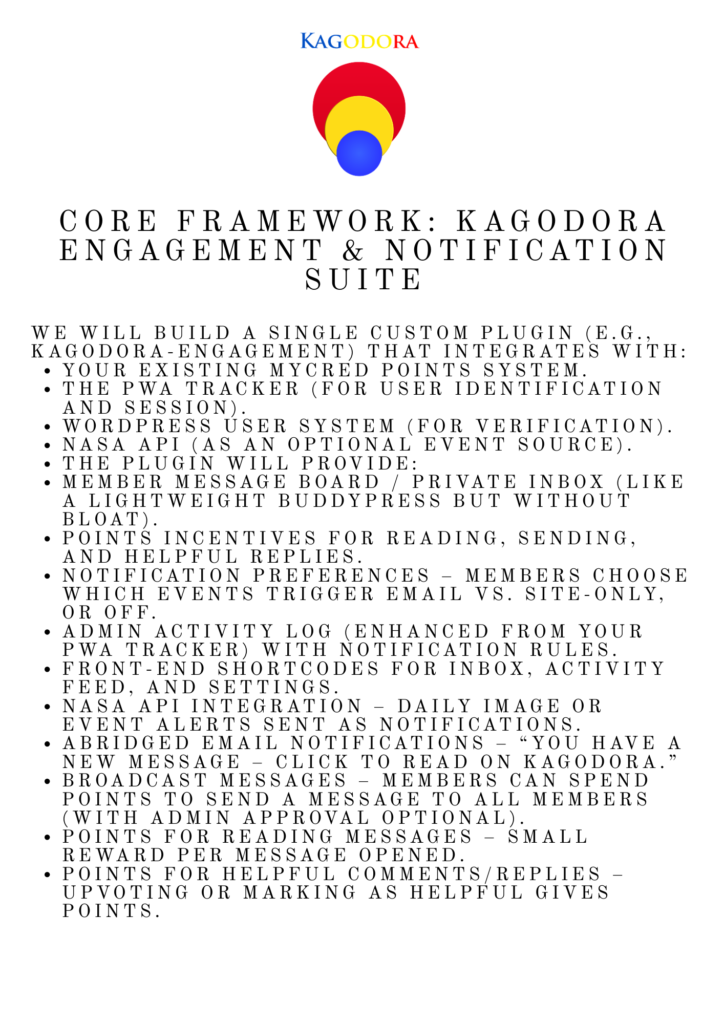
Core Framework: Kagodora Engagement & Notification Suite Ray 2047 AhDo 3:83 (start)
Membership engagement is key to keeping the kagodora growing designing a notification system that both tracts site activity and categorizes it fro display and distribution to members is the plan to procure, cultivate and maintain membership activity. Adding a membership message box or display board that notifies the member like the wallets displays points will also need to be created and added o the current code.
Core Framework: Kagodora Engagement & Notification Suite
We will build a single custom plugin (e.g., kagodora-engagement) that integrates with:
- Your existing myCRED points system.
- The PWA tracker (for user identification and session).
- WordPress user system (for verification).
- NASA API (as an optional event source).
The plugin will provide:
- Member message board / private inbox (like a lightweight BuddyPress but without bloat).
- Points incentives for reading, sending, and helpful replies.
- Notification preferences – members choose which events trigger email vs. site‑only, or off.
- Admin activity log (enhanced from your PWA tracker) with notification rules.
- Front‑end shortcodes for inbox, activity feed, and settings.
- NASA API integration – daily image or event alerts sent as notifications.
- Abridged email notifications – “You have a new message – click to read on Kagodora.”
- Broadcast messages – members can spend points to send a message to all members (with admin approval optional).
- Points for reading messages – small reward per message opened.
- Points for helpful comments/replies – upvoting or marking as helpful gives points.
1. Database Tables (custom, minimal)
We’ll create three custom tables:
| Table Name | Fields | Purpose |
|---|---|---|
wp_kagodora_messages | id, sender_id, recipient_id (0 = all members for broadcast), subject, content, type (private, broadcast, system), points_cost, status (unread, read, deleted), created_at, read_at | Store all messages (private & system notifications) |
wp_kagodora_message_meta | id, message_id, meta_key, meta_value | For likes, helpful flags, etc. |
wp_kagodora_user_preferences | user_id, pref_key (email_notify, site_notify, events_list), pref_value (JSON or serialized) | Store notification settings per user |
Alternatively, we can use WordPress user meta for preferences (simpler), but custom tables are cleaner for high volume.
2. Points Integration (myCRED Hooks)
We will create custom myCRED hooks for:
- Read message – award points when a user marks a message as read (first time only).
- Send message – deduct points when sending a broadcast (optional for private messages).
- Receive helpful rating – award points when a user’s comment/reply is marked “helpful” by another.
- Daily activity – optional: points for logging in and checking inbox.
All point transactions will be logged with a reference like kagodora_message_read_{message_id}.
3. Notification Types & User Preferences
Users will be able to choose, per event type, how they want to be notified:
- Site inbox only (message board)
- Email only (abridged with link back)
- Both (default)
- Off (no notification)
Events to include:
| Event | Trigger | Default Setting |
|---|---|---|
| New private message | Someone sends them a message | Both |
| Broadcast message | Admin or user‑sent broadcast to all | Site inbox only (to avoid spam) |
| New post/page/product | WordPress publish action | Off (admin can enable for all) |
| New user registration | user_register hook | Off |
| New comment on their post | wp_insert_comment | Both |
| NASA daily image | Daily cron fetch | Off (user must opt in) |
| Admin announcement | Admin creates via plugin | Both (forced for important) |
Preferences stored in wp_kagodora_user_preferences as JSON.
4. Frontend Shortcodes & UI
| Shortcode | Purpose |
|---|---|
kagodora inbox | Displays user’s message inbox, with tabs for unread/read/sent. Includes reply, mark as read, delete, and “broadcast” button (if user has enough points). |
kagodora_activity_feed | Shows a global feed of recent site activities (new posts, broadcasts, etc.) – similar to the admin dashboard but public. |
kagodora notification settings | Form for users to adjust their per‑event preferences. |
kagodora_points_summary | Display current points balance and recent transactions related to messaging. |
All shortcodes will be fully responsive and work inside the existing Kagodora PWA.
5. Admin Settings Panel
A new sub‑menu under Kagodora → Engagement with:
- Points settings: amounts for read, send broadcast, helpful reply.
- Notification rules: which events are active globally, default preferences for new users.
- NASA API key field and cron schedule (daily at a chosen time).
- Broadcast approval: require admin approval for user‑sent broadcasts (toggle).
- Email template editor for abridged notifications (using placeholders:
{{subject}},{{link}}, etc.).
6. Email Notifications (Abridged Strategy)
Email will be a teaser, not the full content. Example:
Subject: New message on Kagodora from @JohnDoe
Body:
You have a new message in your Kagodora inbox.
Subject: “Meetup tomorrow?”
Snippet: “Hi, would you like to meet tomorrow at the…”
👉 Read full message and reply on Kagodora
This drives traffic back to the site, preserves engagement, and reduces email complexity.
7. NASA API Integration
We will create a scheduled event (once daily) that fetches:
- Astronomy Picture of the Day (APOD) – send as a system notification to all users who opted in.
- Asteroid close approach data – optional, could be a weekly digest.
The notification will be a special type = 'nasa' message in the inbox, with a link to the NASA site and an image embed (if PWA supports).
Users can toggle this preference in their settings.
8. Points for Reading & Helpful Replies
- Reading a message (first time only): award e.g., +1 point. Prevent multiple awards by checking
read_attimestamp and a meta flag. - Marking a reply as helpful: in the inbox, each message can have a “👍 Helpful” button. Clicking it awards +2 points to the author of the reply and deducts nothing from the reader (or optionally deducts 1 point from the giver – we can configure).
We’ll use myCRED’s mycred_add function.
9. Workflow for Broadcast Messages (Cost Points)
- User clicks “Send Broadcast” in inbox.
- Check if user has sufficient points (e.g., 50 points).
- Show a form: subject, content, and optional “Request admin approval” checkbox (if enabled).
- If approval required, message goes to
pendingstatus, admin approves/rejects from admin panel. - If no approval or approved, message inserted with
recipient_id = 0, points deducted. - All active users receive it in their inbox.
10. Integration with Existing Plugins
- myCRED – points hooks.
- Your PWA tracker – reuse user session, maybe extend
kagodora_pwa_trackerto also log message events. - Image upload & gallery – no direct integration but can be notified when new images uploaded (by hooking into the upload process).
Implementation Phases (After Agreement)
| Phase | Deliverables | Estimated Code Lines |
|---|---|---|
| 1 | Database tables, activation, uninstall | 150 |
| 2 | Basic message CRUD (private messaging) with shortcode | 400 |
| 3 | Points hooks (read, send broadcast) | 150 |
| 4 | User preferences UI and saving | 200 |
| 5 | Email notifications (using wp_mail with custom template) | 100 |
| 6 | Admin settings panel and broadcast approval system | 200 |
| 7 | Activity feed shortcode [kagodora_activity_feed] (from WordPress events) | 150 |
| 8 | NASA API integration (daily cron) | 100 |
| 9 | Points for helpful replies (like system) | 100 |
| 10 | Full testing, documentation, and refinement | – |
Total ~1550 lines of clean, documented PHP/JS.
Mathor.ca is now updated to Kagodora.com Ray 2047 AhDo 3:65
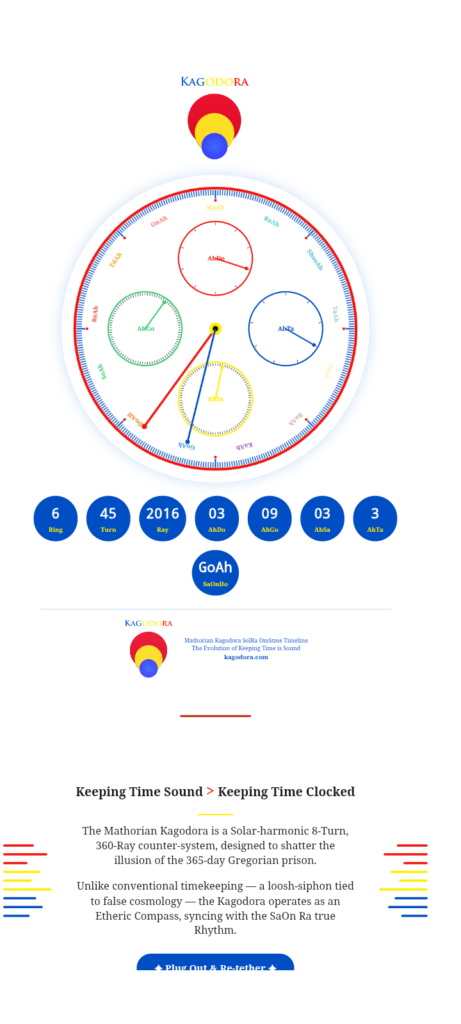
The code script has been updated What changed
- Constants and formulas replaced with the ones from the WordPress plugin (
AHTA_MAX=9,AHSA_MAX=90,AHGO_MAX=90,AHDO_MAX=10,RAY_MAX=360, 80190 seconds per ray, etc.). computeRing()function:6 + floor((ray-1801)/360)– same as plugin.getCurrentTime()rewritten to exactly match the plugin’s logic (usingtotalSecondsand cascading rollovers).- State object now uses
ahta, ahsa, ahgo, ahdo, ray, timestamp(instead ofshu, godo, do). The digital display and the internal variables now correctly map to these names. - The canvas drawing and the rest of the page (gallery, journal, tools, login) are untouched.
- The save/load endpoints (
/save_time.php) should still work; they now store/retrieve the same fields as the plugin.
Now both mathor.ca (standalone) and the WordPress Kagodora plugin use identical time calculations. The next step is to ensure the Node.js app (the original) also matches; but for the PHP‑based
Updating Mathor.ca with the Lates version of Kagodora Ray 2047 3:36 – May 15 1:46
Many updates have been implemented here at Kagodora.com and its time to update the time sequence so that its format can be copied to other sites like Bakaee.com that is next up on the schedule for updating and connecting to the kagodora network.

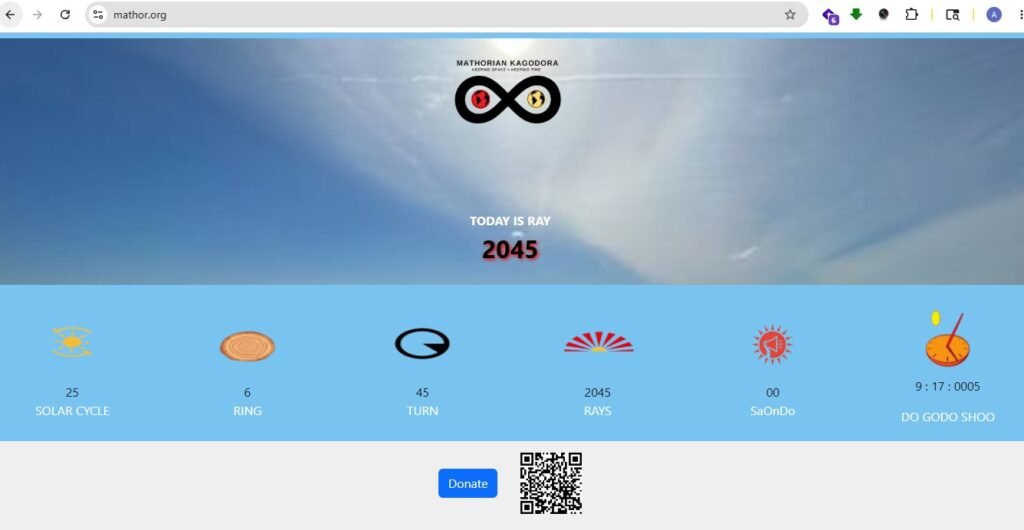
Mathor.org App is back up ray 2045 Do 9:17 May 14 2026 5:40 am
after many hours of building plugins including a PWA for the kagodora, a popup disclaimer for the PWA tracker we built we finally got technical aid from the programer who got the app back up and is also promising to zip the website up so I can gain access to the original code and begin to work on the interrogations that will synchronize the old with the new code and upgrade the current app available on apple and google.
Yea we figured out the PWA
After flushing the cach did not work we disconnected it all together and turns out litespeed could not catch the code and stop it from running.
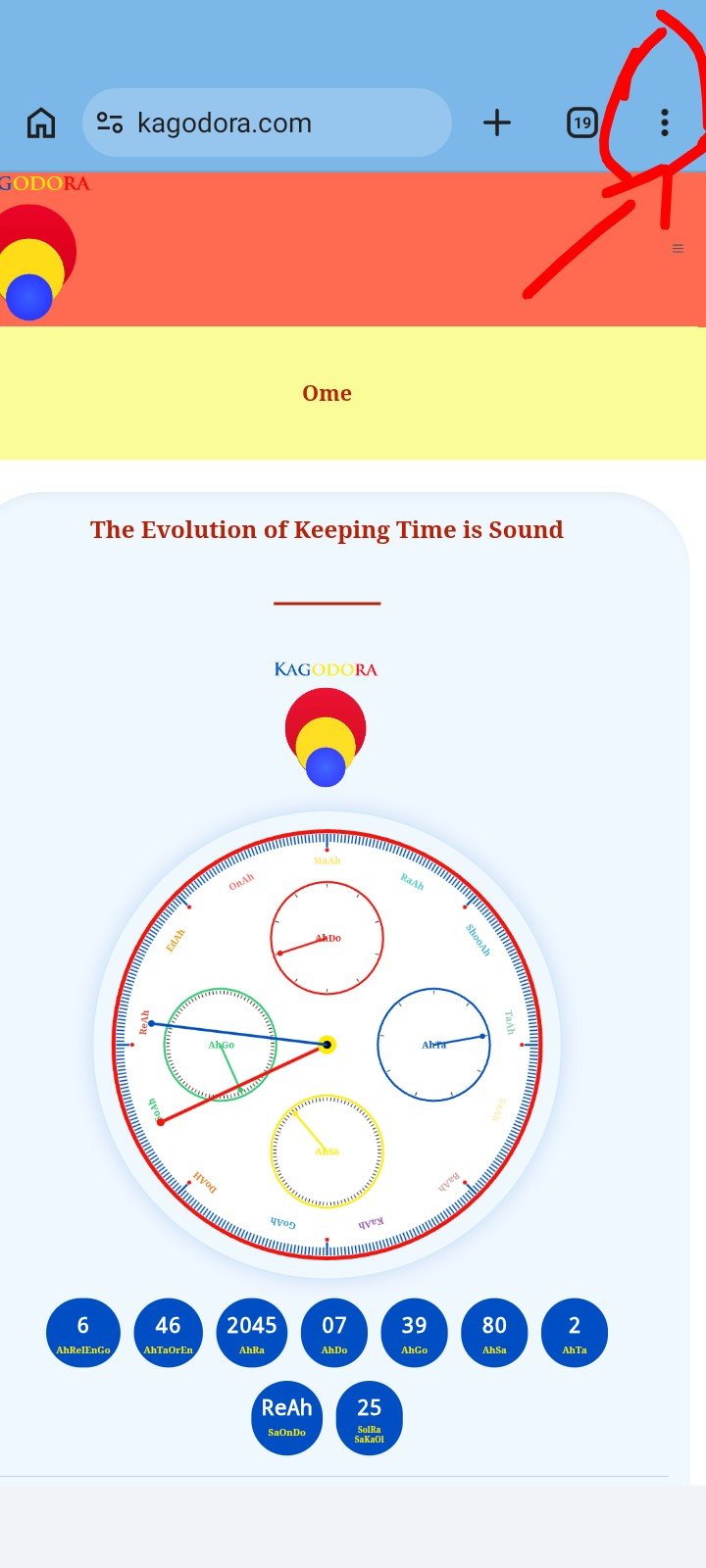
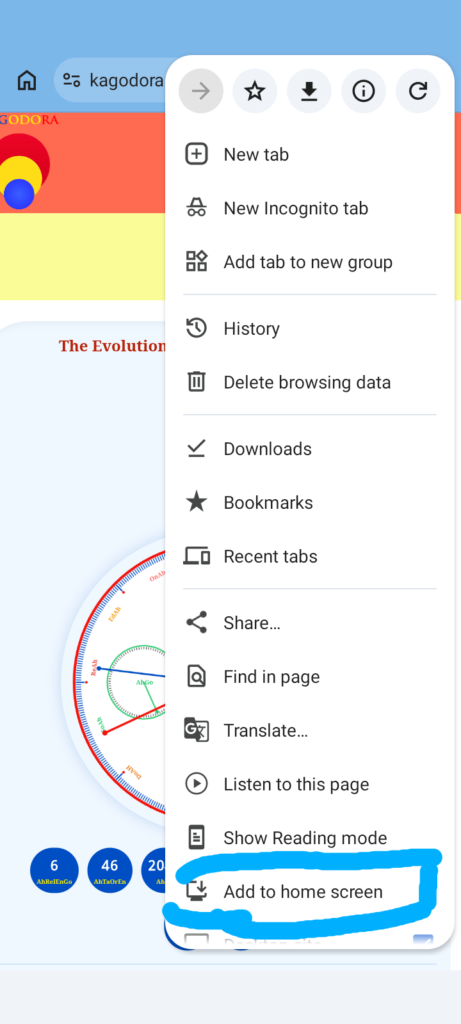
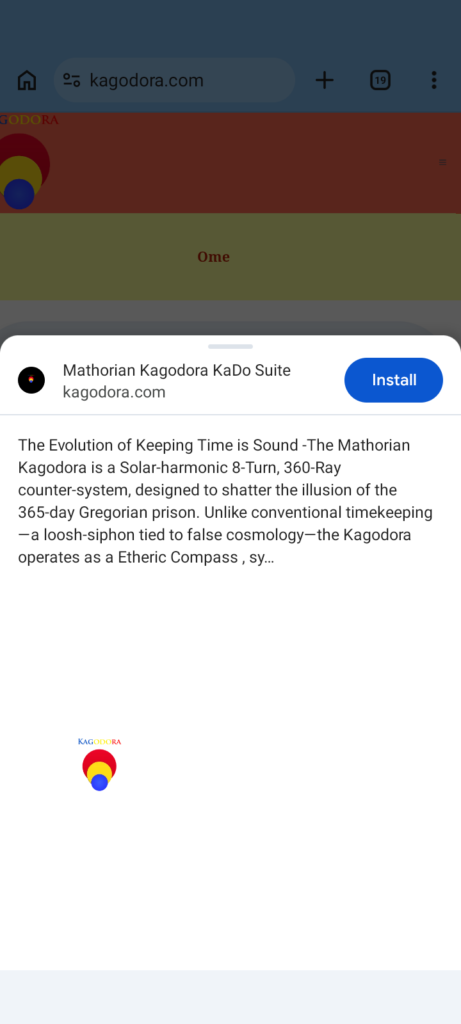
Instructions For Safari or Google (may work the same on other browsers) 1. Go to kagodora.com 2. If the browser prompts you to download the website to your home screen then follow the instructions. 3. If the browser does not prompt you to download the website to your home screen then go to the top right and click the 3 dots and scroll down until you see “Add to home screen” click it then it will take you to another screen where it will prompt you to install. Click install wait a miute and you will see a pop up stating the install is complete. Go to your home screen and look for the kagodora suit icon.
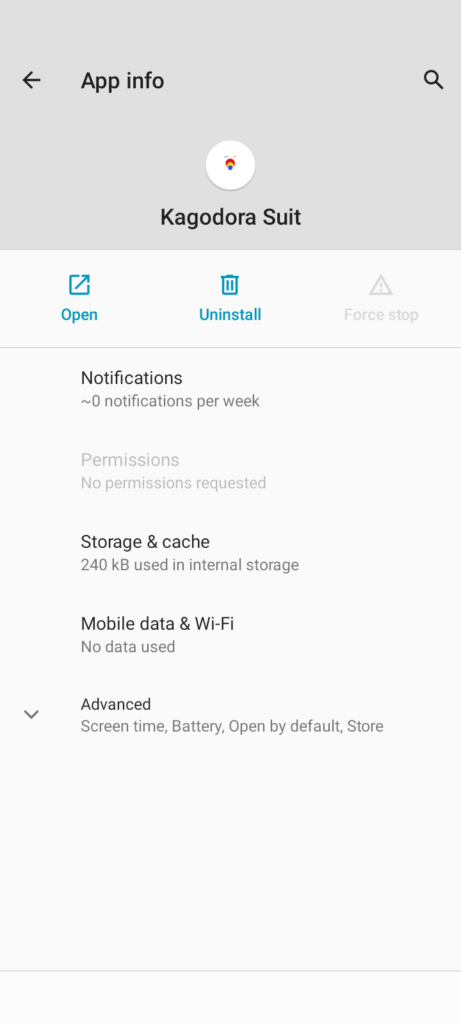

Origin app down time to PWA the kagodora.com Ray 2045
In the process of trying to convert the the website to ios and google app codes the process temporarily set the mathor.org kado back 40 rays promoting an urgency to produce the next best thing a PWA that will allow users to download the website and use it on their mobile phones like an app. Downloading a plugin like Super Progressive Web Apps is marketed as a tool to make the PWA conversions seamlessly easy.
After entering the settings and clicking save I got an error message. Its hard to find plugins that will work with custom code and our websire is over 75% custom code. We will keep plugin away – “This page isn’t working kagodora.com is currently unable to handle this request. HTTP ERROR 500”
After flushing the cach and updating the php we are still getting errors. I may have to write a custom PWA plugin to wrap my plugin as it appears to be a custom plugin in issue. Perhpas there are plugins or apps that work better with custom code? There has been a critical error on this website. Please check your site admin email inbox for instructions. If you continue to have problems, please try the support forums. Learn more about troubleshooting WordPress.
Mathor.org main app down Ray 2045 05/13/2026
While attempting to access files on the main server as part of the process of connecting the original Counter with the current update I noticed a reset of the Kado back to ray 2014 from 2045. This occurred around 9:30 Gregorian time 5:55 Kado.
My operating system out dated not able to download filezila or use the ssh directly.
Attempting to connect the Mathor Original Kado to the updated Kagodora Kado Ray 2045 / May 13 2026
The Architecture – One‑Way Sync (Original → WordPress)
Original Kagodora App (DigitalOcean)
         │
         │ (REST API or shared database)
         ▼
WordPress Plugin (Hostinger)
         │
         │ (WordPress REST API)
         ▼
Mobile App (iOS/Android)
- Original app remains the master – it calculates time, increments rings, etc.
- WordPress plugin becomes a read‑only mirror (or syncs periodically).
- Mobile app can read from either (recommend reading from original for speed, but can also read from WordPress as a backup).
How to Sync: Two Simple Methods
Method 1 – Original App Exposes a REST Endpoint (Cleanest)
If you can add a small API endpoint to your original Kagodora code (even a 10‑line PHP file or Node.js route), the WordPress plugin can call it every minute or on page load.
Example endpoint on original app (https://original.kagodora.com/api/current-time):
jsonCopyDownload
{
  "ahta": 3,
  "ahsa": 45,
  "ahgo": 12,
  "ahdo": 2,
  "ray": 2009,
  "ring": 6,
  "turn": 45,
  "timestamp": 1747123456
}
Then in your WordPress plugin, add a function that fetches this data and updates the database:
phpCopyDownload
function kagodora_sync_from_original() {
    $response = wp_remote_get('https://original.kagodora.com/api/current-time');
    if (is_wp_error($response)) return;
    $data = json_decode(wp_remote_retrieve_body($response), true);
    if (!$data) return;

    global $wpdb;
    $table = $wpdb->prefix . 'kagodora_state';
    $wpdb->update($table, [
        'ahta' => $data['ahta'],
        'ahsa' => $data['ahsa'],
        'ahgo' => $data['ahgo'],
        'ahdo' => $data['ahdo'],
        'ray' => $data['ray'],
        'ahreienqo' => $data['ring'],
        'updated' => current_time('mysql')
    ], ['id' => 1]);
}
Then call this function via WordPress cron every minute:
phpCopyDownload
add_action('wp_ajax_nopriv_kagodora_sync', 'kagodora_sync_from_original');
if (!wp_next_scheduled('kagodora_hourly_sync')) {
    wp_schedule_event(time(), 'hourly', 'kagodora_hourly_sync');
}
add_action('kagodora_hourly_sync', 'kagodora_sync_from_original');
Method 2 – Shared Database (Only if Both Apps Can Access the Same DB)
If your original app and WordPress can both connect to the same MySQL database (e.g., original app uses its own DB, but you grant WordPress read access), then WordPress can read the time directly from the original app’s tables. This is faster but requires database permissions.
What About the Mobile App?
The mobile app (which we will build) can:
- Option A (recommended) – Call the original app’s API directly for the fastest, most stable time.
- Option B – Call the WordPress REST API (which mirrors the original). This keeps everything inside WordPress but adds one extra hop.
I recommend Option A – the mobile app talks directly to your original DigitalOcean app. That gives you the same stability and performance as the original.
My next step is to access digital ocean and retreave the coe copy it to agent 1 take to update the code and explore other options for updating the exiting app.
Development Journal – Ray 2044 – 2026-05-12
Issue Summary
The Kagodora KaDo time system exhibited two critical problems:
- Ring (AhReIEnGo) did not advance correctly
- The plugin stored a manual ring value (
ahreienqo) in the database, but the front‑page display computed the ring from ray using an incorrect starting point (ray 2009 = ring 1). - The correct timeline requires ring 6 to begin at ray 1801, with ray 2009 being the 208th ray of ring 6, and ring 7 starting at ray 2161.
- The plugin stored a manual ring value (
- Front‑end time reset to a future value on refresh
- The JavaScript used a static
updatedtimestamp from the database that never changed after a “Save Current Time” operation. - Without updating the reference timestamp, each page refresh added the elapsed time since the original save, causing the displayed time to jump ahead of real time.
- The JavaScript used a static
Root Causes
- Ring math error:
totalRings = floor((ray - 2009)/360) + 1assumed epoch at ray 2009, but the real epoch starts at ray 1801 (ring 6). - Missing timestamp update: The AJAX save handler did not refresh the
updatedcolumn. The JavaScript also did not reset its internalstate.timestampafter a successful save. - Conflicting data sources: The database stored
ahreienqoseparately from the computed ring, causing potential inconsistency between admin settings and front‑end display.
Remedies Applied
1. Corrected Ring Calculation
In PHP (helper function):
phpCopyDownload
function mathorian_kagodora_compute_ring($ray) {
    return 6 + floor(($ray - 1801) / 360);
}
In JavaScript (mirrored logic):
javascriptCopyDownload
function computeRing(ray) {
    let ring = 6 + Math.floor((ray - 1801) / 360);
    return ring < 1 ? 1 : ring;
}
Now ray 1801 → ring 6, ray 2161 → ring 7, etc.
2. Unified Ring Source
- The front‑page
AhReIEnGodisplay now always callscomputeRing(ray)– no longer relies on a stored value. - The admin settings page shows the ring as read‑only, computed from the current ray.
- When saving any time update (via “Save Current Time” or admin form), the
ahreienqocolumn is automatically set to the computed ring. This keeps the database consistent without allowing manual override.
3. Fixed Timestamp Drift
In the AJAX save handler (PHP):
phpCopyDownload
$wpdb->update($table, compact('ahta','ahsa','ahgo','ahdo','ray','ahreienqo'), ['id'=>1]);
$wpdb->update($table, ['updated' => current_time('mysql')], ['id' => 1]);
In JavaScript (saveCurrentTime function):
javascriptCopyDownload
fetch(ajaxUrl, { method: 'POST', body: params })
    .then(res => {
        if (res.ok) {
            state.timestamp = Date.now() / 1000; // reset local reference
        }
    });
Now every “Save Current Time” operation updates both the database updated column and the JavaScript state.timestamp, so the elapsed time calculation starts fresh from that moment.
Outcome
- Ring increments correctly every 360 rays, matching the intended calendar (ring 6 from ray 1801, ring 7 from 2161, etc.).
- Front‑end time persists accurately across page refreshes and browser restarts.
- Admin settings and front page remain in sync – the ring is always derived from the ray, eliminating conflicting values.
- “Set Time / Calibrate” and “Save Current Time” buttons now fully respect the corrected math and update the reference timestamp.
Next Steps
- Monitor the system for any further drift, especially across long periods without updates.
- Consider adding a server‑side cron job that automatically saves the current time every day to keep the database timestamp fresh even if the front‑end is not visited.
- Document the new ring formula for future reference.